
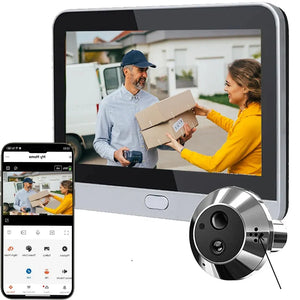

Tuya Smart Two Way Audio Door Eye Viewer With 3MP Camera Tuya 140 Degree Wide Angle Night Vision Video Door Phone Intercom
Tuya-Gold / france
Sale price
€152,96
Regular price
€229,44
Skip to product information


Tuya Smart Two Way Audio Door Eye Viewer With 3MP Camera Tuya 140 Degree Wide Angle Night Vision Video Door Phone Intercom
Sale price
€152,96
Regular price
€229,44
Upgrade Your Home Security With Intelligent Monitoring
Stop guessing who is at your front door or dealing with blurry, unrecognizable security footage. The Tidesmit Smart Two-Way Audio Door Eye Viewer provides crystal-clear 3MP visual clarity to ensure you never miss a visitor or package delivery. This intelligent video intercom acts as your digital doorman, solving home security frustrations with precision technology.
Advanced Features for Total Peace of Mind
- 3MP Ultra-HD Resolution: Captures sharp detail in 2048x1536 resolution for accurate facial identification.
- 140-Degree Wide Angle: Eliminates blind spots at your threshold with a full, expansive field of view.
- Smart Tuya Integration: Fully compatible with the Tuya Smart ecosystem and supports seamless voice control via Amazon Alexa and Google Home.
- Infrared Night Vision: High-performance sensors provide clear monitoring up to 5 meters in complete darkness.
- Two-Way Audio System: Built-in noise-canceling microphone and speaker allow you to speak directly to couriers or guests from anywhere.
- Rugged Build Quality: Features an IP65 weather-resistant rating, ensuring reliable performance against dust and heavy rain.
- Flexible Storage Options: Supports local micro-SD card storage up to 128GB and secure cloud-based encryption.
Our smart viewer is designed for simple, frustration-free installation on most standard door thicknesses (35mm–105mm). By integrating this premium device into your home, you eliminate the vulnerability of traditional, opaque peepholes. Tidesmit ensures your entrance remains monitored with AI-powered motion detection that alerts your smartphone instantly when activity is sensed. Order now for fast delivery and experience the difference that intelligent home security brings to your daily routine. In stock and ready to ship within 24 hours.
Technical Specifications For 3MP WiFi Peephole Doorbell Camera
Tuya Smart Integration And Enhanced Home Security Features
Why Smart Home Owners Choose Tidesmit Security Cameras
