
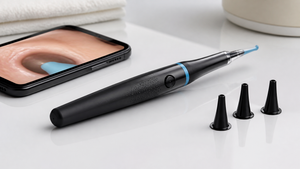

A small camera at the tip of a slim otoscope can turn an awkward ear check into a clear, shareable view. That idea has made digital otoscopes popular for at-home ear wax monitoring, and the Tidesmit 1080p HD Digital Otoscope Ear Wax Removal Camera is one product in that growing category.
Unlike a traditional otoscope, which makes a clinician squint through a narrow lens, a digital otoscope sends the camera feed to a screen or phone. This article explains what these devices are, how the core technology works, and where the Tidesmit model fits without overstating what a home tool can do.
What Is a Digital Otoscope?
A digital otoscope is an ear-inspection tool with a tiny camera located at the tip of the probe. It streams live images to a phone, tablet, or dedicated display, so you can see the ear canal instead of peering through a lens.
This design differs from a traditional otoscope, which uses a light and a magnifying lens. Many digital models use a camera head to capture photos or videos, and the image can be saved or shared. That makes them useful for home ear wax checks, telehealth conversations, and medical education.
The approach has moved beyond gadgets. ScopeAround positions these cameras as tools for personal ear inspection, while WiscMed describes features used in teaching and clinical settings. In a medical office, a shared digital view can help a patient see what the provider sees.
Core Technology Behind Digital Otoscopes
Most digital otoscopes place the camera at the tip of the probe, not behind an eyepiece. That camera head sends a live image to a phone, a dedicated display, or a computer, which helps reduce the narrow “tunnel” view associated with traditional otoscopy.
Specifications vary widely. Some models include a built-in processor to handle the video feed. Others list a 5-inch screen, up to 30 minutes of video storage, or room for up to 3,000 still images on a 64GB memory card. These figures come from manufacturer product pages, not from independent testing, and they do not apply to every digital otoscope.
Digital zoom and saved images may make it easier to spot changes over time or send a photo to a clinician for a second look. WiscMed’s Wispr page describes image sharing as a benefit for documentation and education. Some digital heads are also designed to fit the power handles clinicians already own from brands like Welch Allyn or Heine.
A small display or phone screen can feel more comfortable than a quick glance through a lens, especially if you are trying to describe what you see. But image clarity still depends on lighting, focus, and the condition of the ear canal.
Spotlight on the Tidesmit 1080p HD Digital Otoscope
The Tidesmit 1080p HD Digital Otoscope is a home ear-inspection device marketed around ear wax removal. The “1080p HD” part of the name signals a high-definition camera, but the real-world image depends on the lens, the light, and the screen you use.
Tidesmit 1080p HD Digital Otoscope
The Tidesmit 1080p HD Digital Otoscope is positioned for at-home ear inspection and ear wax management. It belongs to the same category as other personal digital otoscopes: a slim camera probe that broadcasts a live view so you can see cerumen (ear wax) before you decide what to do next.
Because this article relies on the product name and category context rather than a detailed spec sheet, we won’t assign confirmed display size, battery life, or storage numbers to this model. If image quality matters to you, check the manufacturer’s listed camera resolution, light source, and whether the kit includes multiple ear tips.
That distinction matters. A 1080p label suggests clarity, but the user experience also depends on how the camera handles close-up focus and changing light inside the canal. For safe use, follow the instructions that ship with the device, and avoid pushing the tip deeper than the manufacturer recommends.
How to Use a Digital Otoscope for Ear Wax Removal
Most at-home digital otoscopes follow a similar flow: charge the device or connect it to a phone, attach a clean ear tip, and gently position the camera at the outer ear canal. The goal is to view wax, not to dig it out.
Small ear canals and wax build-up can make a clear view difficult. If the image looks blocked, you may be pressing against cerumen or the canal wall. Back off, adjust the light, and try a different angle instead of forcing the tip deeper.
These devices are not replacements for professional care. A home otoscope can help you notice changes or share an image with a clinician, but it should not be used to remove impacted wax or to treat pain, discharge, or hearing loss. Wipe the camera head and replace disposable tips according to the manufacturer’s instructions.
Digital Otoscope vs. Traditional Otoscope: A Comparison
A traditional otoscope often creates a “tunneling effect” because the view is limited to what the clinician can see through an eyepiece. A digital otoscope puts the camera at the tip, so the image is captured closer to the ear canal and shown on a larger screen.
That difference can make a quick glance more useful. Instead of relying on a brief look, a clinician can review a still image or share live video with a colleague. WiscMed’s Wispr page describes that style of image sharing as a benefit in clinical and teaching settings.
Some physicians report replacing traditional otoscopes with digital models. A pediatrician mentioned on the WiscMed Wispr page described moving from a MacroView otoscope to a Wispr digital otoscope. That does not mean every digital otoscope matches the diagnostic function of medical-grade equipment; home devices are generally screening tools.
Frequently Asked Questions About Digital Otoscopes
Are digital otoscopes safe for home use?
When used as directed, home digital otoscopes are generally low-risk for viewing the outer ear. Stop if you feel pain, avoid deep insertion, and see a professional for pain, hearing loss, or discharge.
Can a digital otoscope replace a doctor's visit?
No. These cameras help you monitor and share a view, but they do not diagnose conditions. A saved image can support a telehealth conversation, yet it doesn’t replace professional equipment or expertise.
What features should I look for in a digital otoscope?
Camera resolution, light source, tip size, and screen or phone compatibility matter most. Some models list storage up to 3,000 images or 64GB memory. Check for included ear tips and cleaning instructions.
